
How to Get the Transcript of a TikTok Video (Even Without Captions)
TL;DR: TikTok shows auto-generated captions only when the creator turned them on, and it doesn't let you copy them. To get the text of any public TikTok, paste its link into PageSum: you get the full transcript next to a summary, and you can copy it or download it as TXT (or SRT and VTT subtitle files when the transcript has timing). If the video has no captions, PageSum transcribes the audio. Most TikToks are short enough for that to be free.
You want the exact words from a TikTok: a quote, a recipe, a script you're studying, a claim you want to check. Watching it five times and typing along is the slow way.
Option 1: TikTok's Own Captions
TikTok can show auto-generated captions while you watch:
- For all videos: go to Profile → ☰ → Settings and privacy → Accessibility and turn on Always show auto-generated captions.
- For one video: tap the CC (captions) icon on the video, when there is one.
The catch: captions only exist if the creator enabled them when posting, so many videos have none. They also scroll past line by line, and TikTok gives you no way to copy them as text.
Option 2: The Caption Under the Video
Creators often put the important part (a recipe's ingredients, a list of tips, the source) in the post caption. Tap more under the video to expand it. It's worth checking first, but it's rarely the full script.
Option 3: A Transcript From the Link
PageSum turns a TikTok's speech into text, whether or not the creator added captions:
- Copy the link: tap Share → Copy link.
- Paste it into pagesum.app/dashboard.
- Get the transcript in the panel next to the summary. Use Copy, or download it as TXT from the export menu. When the transcript comes with timing information, the menu also offers SRT and VTT, subtitle files you can drop into a video editor.
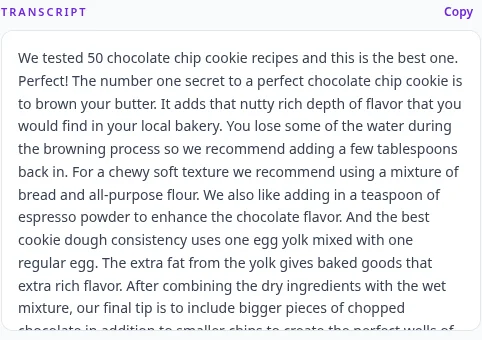
Here's the transcript PageSum produced for a 1-minute Tasty cookie TikTok we tested on October 6, 2026. It's every spoken word, in order:
How Long a TikTok Can Be
The free plan covers the first 5 minutes of any TikTok. On Pro, a TikTok with captions works at any length. When it has none, PageSum transcribes the audio with AI up to a limit per plan:
| Free | Pro | Max | |
|---|---|---|---|
| Video summaries per day | 1 (2 on your first day) | Unlimited | Unlimited |
| TikToks without captions | First 5 minutes | First 25 minutes | First 90 minutes |
| Transcript copy and download | Yes | Yes | Yes |
| Timestamped transcript synced to the video | No | Yes | Yes |
That limit rarely matters for TikTok: the median TikTok summarized on PageSum is 68 seconds long, and 6 of the last 8 were under 3 minutes. Longer ones are transcribed from the start.
What Doesn't Work
- Private accounts and friends-only videos. PageSum can only open public videos.
- Lives in progress. Wait for a saved video.
- Music-only videos. A transcript captures speech, not song lyrics over a track or on-screen text.
Frequently Asked Questions
Can I get a transcript of a TikTok without captions? Yes. PageSum transcribes the audio with AI when the video has no captions: up to 5 minutes free, 25 on Pro and 90 on Max.
Can I download a TikTok transcript as SRT? Yes, when the transcript has timing information: the export menu then offers SRT and VTT alongside TXT.
Do I need a TikTok account? No. A public video's link is enough. You need a free PageSum account.
Is the transcript accurate? It's as accurate as the speech is clear. Background music, overlapping voices and heavy slang can cause mistakes, so check names and numbers against the video.
Get a TikTok transcript free · Related: How to Turn TikTok Videos Into Notes · How to Turn a Recipe Video Into Written Steps · How to Summarize TikTok and Instagram Videos
Tested on October 6, 2026: the PageSum team ran the steps in this guide on the live app with public videos. Screenshots are from those runs.
Try it on your video
Paste a TikTok, Instagram Reel, Facebook, X or YouTube link and get the transcript and a summary in seconds. Free, no credit card.
More posts
How to Summarize a Podcast Episode with AI (YouTube or MP3)
Paste a podcast episode’s YouTube link or upload the MP3 and get the key points in a minute. See how long episodes are handled.
How to Summarize an X (Twitter) Video with AI
Paste an X (Twitter) post link and get an AI summary and transcript of its video in seconds, even without captions. See which links work.
How to Turn a TikTok or Reel Recipe Video Into Written Steps
Turn a TikTok, Instagram or Facebook recipe video into written steps. We tested two Tasty TikToks: what came through, and what didn't (measurements).
How to Summarize a Facebook Live Replay (We Tested a 2.5-Hour Stream)
We summarized NASA's 2 h 27 min launch stream to show what a summarizer can and can't do with a Facebook Live replay, and how to get the part you need.
How to Summarize Lecture Videos and Turn Them Into Study Notes
Summarize a recorded lecture or YouTube class in a minute, jump to the right chapter, ask questions, and turn it into flashcards and quizzes.
How to Get a Facebook Reel Transcript (Even With No Captions)
Paste a Facebook Reel, video or Live replay link and get the transcript and a summary. Copy it or download TXT, SRT or VTT. Works without captions.